
- 0
- 1,930 word
.png)
BookMaster – Ebook App Builder
Convert DOCX, HTML, and selectable-text PDF documents into polished standalone Android ebook apps
through one complete desktop-to-mobile workflow.
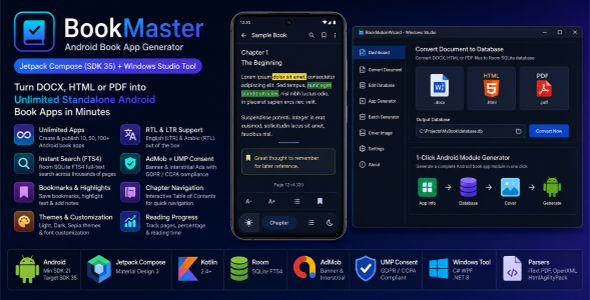
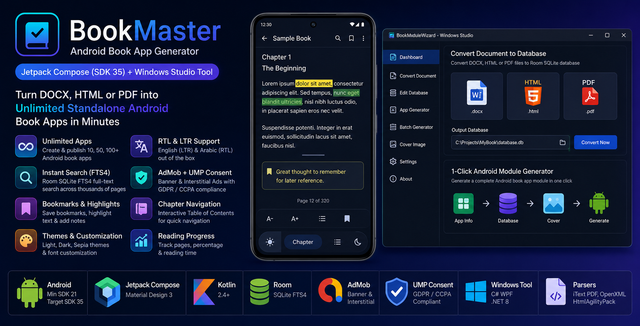
BookMaster is a cohesive ebook app-building product that combines a reusable native Android
reader template with a companion desktop generation utility.
The desktop utility prepares the book content, SQLite database, chapter structure, cover artwork, metadata,
package configuration, and app module used by the mobile reader.
Both components are built to work together as one complete product rather than as separate, unrelated
applications.
BookMaster is designed for authors, publishers, educational-content creators, agencies, and Android developers
who want to transform existing documents into modern branded ebook applications without repeating the same
database and project-setup work for every book.
Prepare Content → Convert Document → Review Chapters → Generate Module → Build App → Publish
Product Cohesion & Architecture Overview
Why BookMaster is One Single Cohesive Mobile Application Product:
BookMaster is categorized under Mobile Applications / Android as a complete native Android
Ebook Application Generator.
The Windows desktop generation utility (BookModuleWizard) and the native Android reader engine
(:engine) are not separate or competing products—they form two essential, interdependent
components of one unified application publishing workflow:
- Exclusive Schema Alignment: The desktop utility parses raw DOCX, HTML, and PDF
documents specifically into the Room SQLite database schema (book_pages,
book_pages_fts) and metadata structure required by the native Android reader engine. - Automated Android Code Generation: The desktop utility builds the exact Kotlin
dependency-injection config (AppConfig.kt), asset placements, cover WebP assets, and Gradle
module manifests that the native Android Studio project imports. - Interdependent System Functionality: The desktop utility cannot produce final
standalone apps by itself (it generates an Android Studio source code module), and the Android reader
template cannot render books without the database and configuration produced by the desktop tool.
Together, these two components form a seamless desktop-to-mobile toolchain that allows authors, publishers,
and developers to generate unlimited custom Android ebook apps for Google Play.
Live Demo & Video Walkthrough
-
Generated Android App:
View “As a Man Thinketh” on Google Play
— A real ebook application created with the BookMaster workflow. -
Complete Video Demonstration:
Watch the Full BookMaster Walkthrough
— See the desktop generation utility and generated Android reader from document import to final project
output.
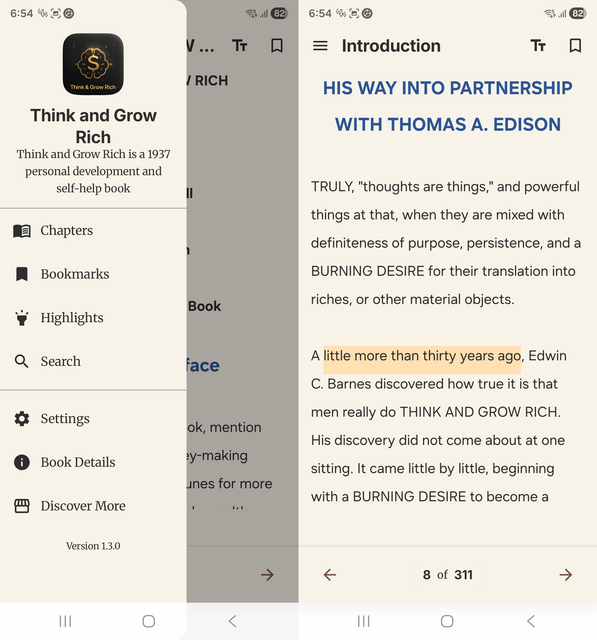
A Complete Android Ebook Reader — Not Just a Basic Template
The generated Android application includes a complete reading experience built with Kotlin, Jetpack Compose,
Material Design 3, Room, and SQLite FTS4.
It is designed to feel fast, modern, responsive, and comfortable on both phones and tablets.
Search & Content Discovery
-
Fast Full-Text Search:
Room and SQLite FTS4 indexing provide fast search across large books and thousands of content entries. -
Contextual Search Results:
Search results display the matching text in context, helping readers understand where and how a word or
phrase appears. -
Search History:
Previous searches are saved locally so readers can quickly return to recent topics without typing them
again. -
Jump-to-Result:
Selecting a result opens the exact matching page or content location instead of forcing the user to search
manually. -
Chapter Navigation:
An interactive Table of Contents allows readers to move directly between chapters and sections.
User Personalization & Reading Tools
-
Interactive Text Highlighting:
Readers can select important passages and save highlights using multiple color choices. -
Bookmark Management:
Save important pages, review saved bookmarks, and return to them through a dedicated bookmark interface. -
Personal Reading Notes:
Users can attach their own notes to selected content and keep them available for future reading sessions. -
Reading Progress:
The app remembers the last opened location and tracks reading completion progress. -
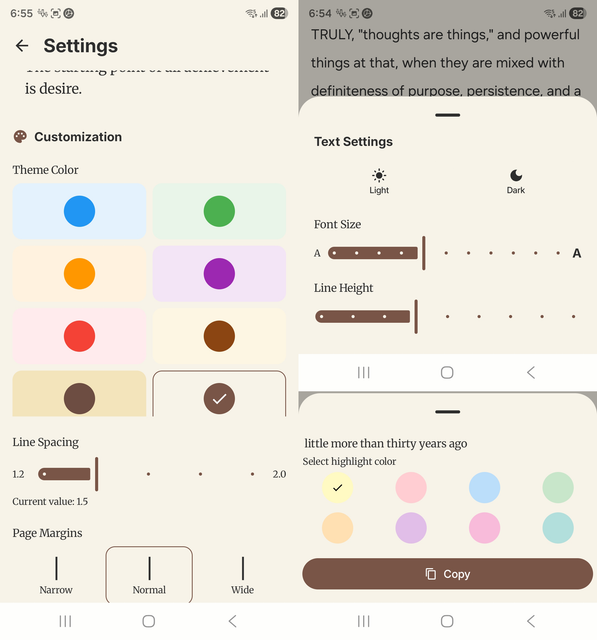
Typography Customization:
Readers can adjust font size, line spacing, and font family to create a more comfortable reading experience.
Flexible Themes & Visual Customization
-
Light Mode:
A clean, bright reading experience for daytime use. -
Dark Mode:
A comfortable low-light interface designed for night reading. -
System Mode:
The app can automatically follow the device theme. -
Multiple Color Palettes:
Included palette options allow the reader interface to match different books, brands, and reading
preferences. -
Material Design 3:
Modern components, smooth transitions, and a consistent native Android experience.
Adaptive Phone & Tablet Layouts
The interface adapts to different screen sizes and orientations. BookMaster supports compact phone layouts as
well as expanded tablet layouts, providing a more natural reading experience across supported Android devices.
Offline-First Reading
The entire book is stored locally inside the application, so readers can access the content without an internet
connection.
User data such as bookmarks, highlights, notes, search history, preferences, and reading progress is also stored
locally on the device.
- No internet connection is required to read the book
- Fast local content loading
- Bookmarks and highlights remain available offline
- Reading preferences are preserved between sessions
- No external book-content server is required
LTR & RTL Language Support
BookMaster includes dedicated starter templates for Left-to-Right and Right-to-Left reading experiences.
The package includes an English LTR template and an Arabic RTL template, making it suitable for English, Arabic,
Hebrew, and other supported languages.
Important: Text-to-Speech and audio playback are not included in the current version.
AdMob-Ready Monetization
The Android reader is already prepared for Google AdMob monetization. Buyers can replace the included test or
demonstration identifiers with their own AdMob account information and configure advertising from the central
app settings.
- Banner Ads: Ready-to-configure banner placements inside the reader experience.
- Interstitial Ads: Ready-to-configure interstitial placements for suitable navigation
points. - Central Ad Configuration: Manage advertising identifiers and enable or disable ads from one
configuration area. - Google UMP Integration: Includes Google User Messaging Platform support for consent-message
workflows. - Test and Production Setup: Documentation explains how to use test IDs during development
and production IDs before release.
The final publisher is responsible for configuring their own AdMob account, consent messages, privacy policy,
Google Play disclosures, advertising declarations, and applicable regional requirements.
Why Choose BookMaster?
-
One Cohesive Product:
The desktop utility prepares the content and project files used by the included Android reader template. -
Reusable App-Building Workflow:
Create different book projects with their own content, branding, package namespace, cover, and
configuration. -
Less Repetitive Work:
Reduce manual database creation, file placement, cover processing, and module-configuration tasks. -
Multiple Source Formats:
Import DOCX, HTML, and selectable-text PDF documents. -
Modern Native Codebase:
Built with Kotlin, Jetpack Compose, Material Design 3, Room, Hilt, and MVVM-based architecture. -
Offline-First Reader:
Book content and reader-generated data remain available locally without requiring a remote backend. -
Publisher-Friendly Customization:
Configure titles, author information, package IDs, covers, themes, typography, advertising, and reader
behavior.
The software does not impose an internal limit on project generation. The publication, distribution, and
licensing of each final application must follow the applicable Envato license and third-party platform policies.
BookModuleWizard Desktop Generation Utility
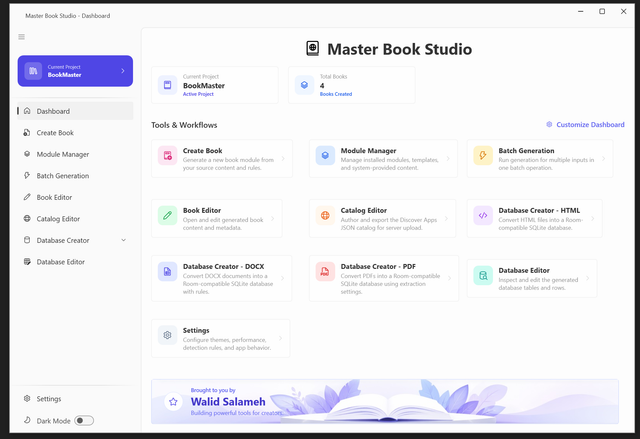
BookMaster includes BookModuleWizard, a native C# WPF desktop utility built with .NET 8.
The utility is supplied as a portable executable inside the Tools/ folder and is designed for
supported Windows 10 and Windows 11 computers.
Document-to-Database Converter
- Import
.docxdocuments - Import
.htmldocuments - Import selectable-text
.pdfdocuments - Automatically detect chapters and headings
- Apply configurable heading-detection rules
- Unwrap broken paragraph lines
- Use custom page-marker regular expressions
- Review extracted content before generation
- Generate Room-compatible SQLite book databases
Guided Android Module Generator
- Set the app title and book title
- Set the author name
- Configure the Android package namespace
- Insert the generated SQLite database
- Select and process the book cover
- Convert cover artwork to an optimized WebP asset
- Configure generated module and Gradle files
- Prepare the module for Android Studio
Integrated Content & Database Editor
- View generated pages and chapters
- Search book content
- Edit existing content
- Add new pages or chapters
- Delete unwanted entries
- Edit book metadata
- Review the generated database before building the app
Batch Generator
Process multiple prepared books through the included batch-generation workflow.
The package documentation includes the expected CSV structure, field reference, sample values, processing
instructions, output explanation, and a ready-to-use sample CSV file.
Technical Architecture
| Minimum Android Version | Android 5.0 – API Level 21 |
| Target Android SDK | SDK 35 |
| Android Language | Kotlin |
| Android UI | Jetpack Compose and Material Design 3 |
| Architecture | Clean Architecture, MVVM, and Repository Pattern |
| Dependency Injection | Hilt |
| Database | Room Persistence Library with SQLite |
| Search | SQLite FTS4 Full-Text Search |
| Desktop Language | C# with .NET 8 |
| Desktop Framework | Windows Presentation Foundation – WPF |
| Document Processing | DOCX, HTML, and selectable-text PDF processing |
| Desktop Systems | Windows 10 and Windows 11 |
Included Project Modules
-
:engine—
Shared reader engine containing database access, navigation, search, search history, bookmarks, highlights,
notes, themes, typography, progress tracking, responsive layouts, and advertising components. -
:book_template_en—
English and Left-to-Right starter application. -
:book_template_ar—
Arabic and Right-to-Left starter application.
What You Receive
-
Complete Android Studio Source Code
Includes the shared reader engine, English starter template, Arabic starter template, application resources,
and build configuration. -
BookModuleWizard Desktop Utility
Includes the portable desktop application and required files for the generation workflow. -
Document Conversion Tools
Convert supported DOCX, HTML, and PDF content into structured book databases. -
Content and Database Editor
Review, search, add, edit, and remove generated book content. -
Batch Generator
Process multiple prepared books using the documented CSV-based workflow. -
AdMob and Google UMP Integration
Configure monetization and consent workflows using your own publisher accounts and settings. -
Comprehensive Documentation
Includes a non-technical quick-start guide, annotated desktop workflow, Android Studio setup, AppConfig
reference, Batch Generator guide, theme customization, troubleshooting, architecture overview, and Google
Play publishing instructions. -
Item Updates and Customer Support
Updates and support are provided according to the applicable marketplace terms.
System Requirements
Desktop Utility
- Windows 10 or Windows 11
- Permission to run the included desktop executable
- Sufficient storage for source documents, generated databases, and project files
Android Development
- Android Studio
- Android SDK 35
- A compatible Java development environment configured through Android Studio
- Basic familiarity with opening, testing, signing, and building Android projects
Optional Publishing & Monetization Accounts
- Google Play Console account for publishing
- Google AdMob account for monetization
- A privacy-policy page when required by the app configuration and publishing region
Recommended For
- Independent authors
- Digital book publishers
- Educational-content creators
- Schools and training organizations
- Religious and cultural publishers
- Content owners
- Digital agencies
- Android developers
- Businesses converting documents into branded mobile readers
- Creators publishing English or Arabic ebook applications
Important Product Notes
-
BookMaster prepares the content, database, and Android module. Android Studio is still required to test,
sign, build, and publish the final application. -
Output quality depends on the formatting and structure of the source document. Complex documents may require
preparation or cleanup before conversion. -
Scanned or image-only PDFs may require external OCR processing before they can be imported as selectable
text. -
Buyers must replace demonstration package names, book content, covers, icons, advertising identifiers,
privacy links, and sample configuration before publishing. - Google Play approval is controlled by Google and cannot be guaranteed by the item author.
-
The software does not impose an internal project-generation limit. Each published or distributed final
application must follow the applicable Envato license and third-party platform requirements. -
Preview books, covers, logos, screenshots, and demonstration content are not included unless specifically
identified as part of the downloadable package. - Text-to-Speech and audio playback are not included in the current version.
Build a Better Ebook App Workflow
BookMaster combines document conversion, structured local storage, content management, full-text discovery,
reader personalization, adaptive layouts, offline access, AdMob-ready monetization, and native Android source
code in one connected product.
Prepare your content, generate the database and module, open the project in Android Studio, apply your final
branding and publisher configuration, and build your standalone ebook application.
Prepare. Generate. Customize. Build. Publish.
<!– Consolidated Item Submission Tags (Envato CodeCanyon Form) –>
<!—Consolidations applied:
– Near-duplicates (“android book app generator”, “android book app maker”, “android ebook creator”) consolidated to single term: “android book app maker”
– Redundant terms (“android studio”, “android studio project”) trimmed to single term: “android studio”
—>
android book app maker, android ebook, book app, docx to app, html to app, pdf ebook reader, jetpack compose, material design 3, room database, fts4 search, admob, ump consent, multi-module, android studio, book publisher
Source
Author

abcdmedia7@gnmail.com
Related Posts
PaySuite – SaaS Invoice and Billing Management System With Laravel Admin Panel
- 0
- 629 words
LIVE PREVIEWBUY FOR $19 PosX | Retail POS, Billing & Inventory Management Software Preview link: PosX – Retail POS, Billing & Inventory...
Wholesale – Inventory Control and Inventory Management System
- 0
- 493 words
LIVE PREVIEWBUY FOR $41 Wholesale – Inventory Control and Inventory Management System Wholesale is a complete inventory management software. Wholesale can be...
FlexBuy | Buy Now Pay Later Customer and Merchant Flutter App With Laravel Admin
- 0
- 1,268 word
LIVE PREVIEWBUY FOR $99 FlexBuy is a complete Buy Now Pay Later platform. Ship your own BNPL business in a weekend. FlexBuy...
Kreta – Social CRM PHP Script
- 0
- 131 words
LIVE PREVIEWBUY FOR $39 About Kreta Application This software is mainly a customer relationship management system based on social media and manual....
HyperCommerce – Multivendor eCommerce Marketplace – Flutter Apps & Laravel Admin Panel
- 0
- 817 words
LIVE PREVIEWBUY FOR $19 HyperCommerce – Multivendor eCommerce Marketplace – Flutter Apps & Laravel Admin Panel HyperCommerce – Complete Multivendor eCommerce Solution:...
DevCase Class Library for .NET Framework and .NET Core
- 0
- 2,613 words
LIVE PREVIEWBUY FOR $68 DevCase Class Library for .NET Framework and .NET Core Empowering Modern Rapid Application Development ⚙️ Online API Reference...